

API
With the API you read conversations, contacts, complaints and statistics, write the catalogue and knowledge, do what the buttons in the panel do, and ask Otto from your own app.
On this page
API keys
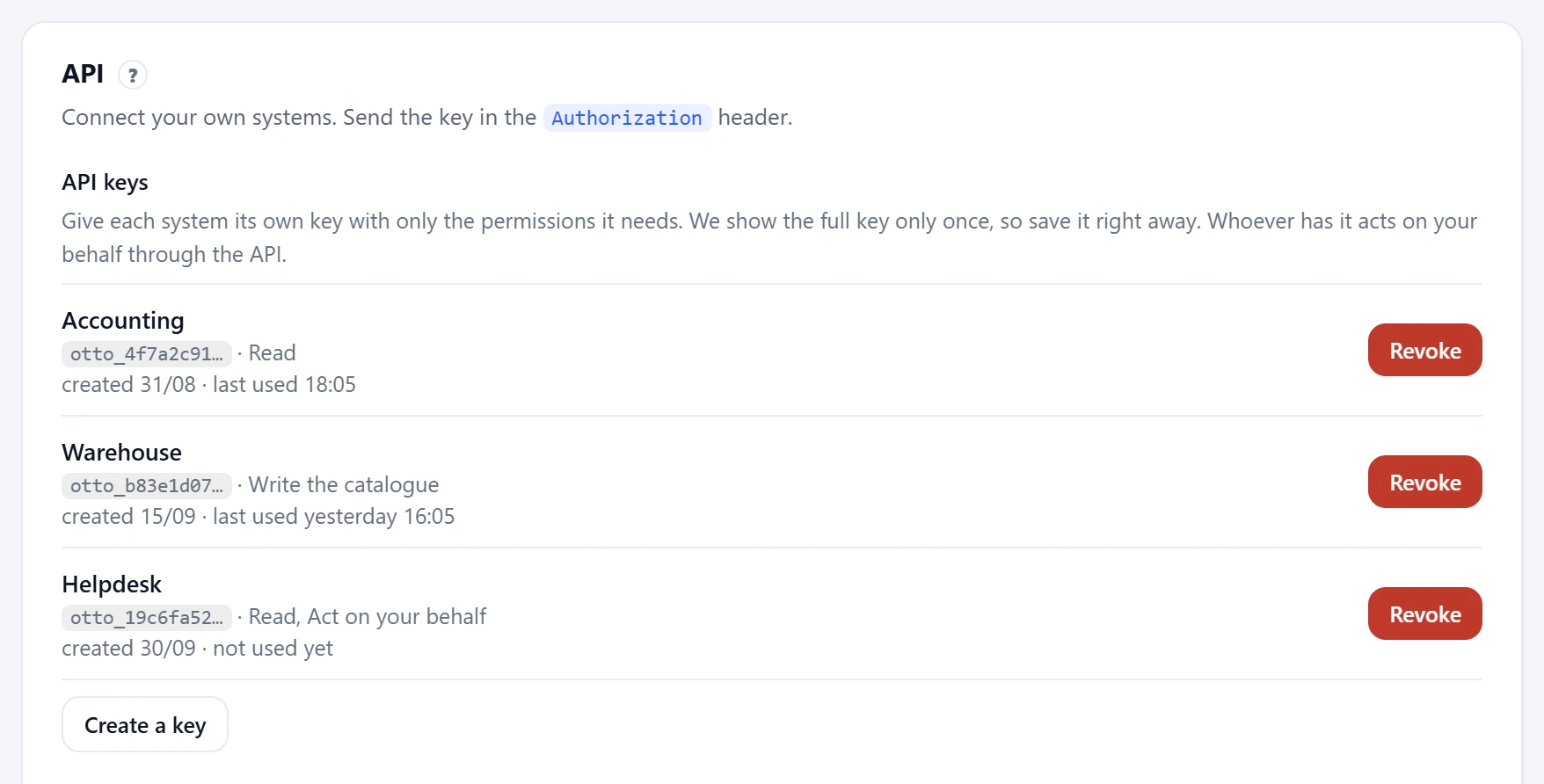
In the panel open Settings, the Connections section, the API row, and click Create a key. Name the key after the system that will use it and pick what it may do. Send the key with every request in the Authorization: Bearer <key> header.
| Permission | What the key may do |
|---|---|
read | Read conversations, contacts, complaints, unanswered questions, products, knowledge and statistics. Every GET except webhooks. |
write | Actions like the panel buttons, and adding and deleting knowledge. |
catalogue | Write and delete products in the catalogue. |
webhooks | View webhook deliveries, resend them and send a test event. |
webhooks_write | List, add and delete webhooks through GET, POST and DELETE /v1/webhooks, for example from Zapier or Make. Only someone who may add webhooks can create a key with it. |
ask | Ask Otto through POST /v1/ask and POST /v1/chat and pass on the customer's contact. Each answer counts towards your plan limit. |
mcp | Only the MCP server for an AI assistant. Other API addresses do not work with it. |
mcp_write | The MCP server may also change things: add knowledge, add a note, add or remove a conversation tag, resolve and reopen it, mark a contact handled, hide an unanswered question. Always together with mcp. |
Give each system its own key with only what it needs. Accounting needs just read, a stock system catalogue. Every address in API reference shows the permission it needs. Without it you get 403 with errcode insufficient_scope.
The API, webhooks and the MCP server are part of the Business and Custom plans. Writing the catalogue through the API works on every plan.
Your first request
curl https://api.ottoai.eu/v1/me \
-H "Authorization: Bearer $OTTO_API_KEY"const r = await fetch("https://api.ottoai.eu/v1/conversations?status=human&limit=20", {
headers: { Authorization: "Bearer " + process.env.OTTO_API_KEY },
});
if (!r.ok) throw new Error((await r.json()).errcode);
const { conversations, nextBefore } = await r.json();$ch = curl_init("https://api.ottoai.eu/v1/leads?since=2026-10-01T00:00:00Z");
curl_setopt_array($ch, [
CURLOPT_HTTPHEADER => ["Authorization: Bearer " . getenv("OTTO_API_KEY")],
CURLOPT_RETURNTRANSFER => true,
]);
$kontakty = json_decode(curl_exec($ch), true)["leads"];Format
- All responses are JSON in UTF-8.
- Times are ISO 8601 in UTC, for example
2026-10-10T08:00:00.000Z. - Conversation and contact ids are UUIDs, complaint and unanswered question ids are numbers in a string.
- The full specification is in OpenAPI 3.1, which you can load into Postman, Insomnia or a client generator. All routes are listed in API reference.
Paging
Lists return nextBefore. Send it back as before= until it is null. It is an opaque string, do not build it yourself. The row count on a page does not tell you that you reached the end.
let before = null;
do {
  const r = await fetch("https://api.ottoai.eu/v1/leads?limit=100" + (before ? "&before=" + before : ""), { headers });
  const d = await r.json();
  for (const contact of d.leads) process(contact);
  before = d.nextBefore;
} while (before);
Filters
sinceanduntillimit the creation time (from, up to but not including),updatedSincethe last change. They take ISO 8601, a bad time returns 400.- Conversations:
status(bot,human,resolved),outcomeandlang. - Complaints:
status(new,approved,rejected,resolved) andkind(claim,withdrawal). limitis at most 100 for conversations, contacts, complaints and questions (default 50), and 200 for products and knowledge (default 100).
Errors
Every error has { error, errcode, requestId }. errcode is stable and in English, use it in your code. error is a sentence for people. A bad parameter also adds errors with the exact path.
{
  "error": "Neplatný parameter.",
  "errcode": "invalid_param",
  "errors": [{ "path": "status", "message": "Použite bot, human alebo resolved." }],
  "requestId": "1f0c6a7e-3b9a-4f0e-9c1d-2a7b8e5d4c3f"
}| Code | Meaning |
|---|---|
400 | Bad request, errors says exactly what. |
401 | Invalid or missing key. |
403 | The feature is not in your plan (api_not_in_plan, webhooks_not_in_plan, mcp_not_in_plan), the key lacks the permission (insufficient_scope), Otto is switched off in your settings (otto_off) or you blocked this customer (blocked). |
404 | The record does not exist or is not yours. Records of other companies return 404, never 403. |
409 | The action does not fit the current state, such as taking over a resolved conversation (conv_resolved). |
429 | Too many requests. Retry-After says how many seconds to wait. |
The error texts are in Slovak for now. Every response has an x-request-id header. Send your own and we return it, and we can find it in our logs too.
Limits
The limit is 120 requests per minute per company. RateLimit-Limit, RateLimit-Remaining and RateLimit-Reset in every response tell you what is left and in how many seconds the limit frees up. You can send the whole catalogue through snapshot at most 12 times per hour. Questions to Otto are limited to 30 a minute per key and 60 per company, and new conversations through the API to 600 an hour per company (429 with errcode new_conversations_rate; continuing an existing conversation does not count).
Actions
What the buttons in the panel do, the API can do too. Actions send the same webhook events as the panel.
| Route | What it does |
|---|---|
POST /conversations/<id>/messages | Replies to the customer as a colleague. Otto stays quiet in the conversation, a customer who left your website gets the reply by email. |
POST /conversations/<id>/notes | An internal note the customer never sees. |
POST /conversations/<id>/takeover | Takes over the conversation. Without operatorId the current assignee stays. |
POST /conversations/<id>/release | Hands the conversation back to Otto. |
POST /conversations/<id>/resolve, /reopen | Resolves the conversation, or reopens it. |
PATCH /leads/<id> | Marks a contact as handled: { "handled": true }. |
PATCH /returns/<id> | Decides on a complaint, notify: true emails the customer. |
POST /unanswered/<id>/dismiss | Hides an unanswered question from the list. |
DELETE /conversations/<id> | Erases the conversation with its messages, notes, contacts, complaints and returns including photos, the same as deleting it in the panel. Use it when a customer asks you to erase their data. It cannot be undone. |
DELETE /leads/<id> | Erases one contact, the conversation stays. |
curl -X POST https://api.ottoai.eu/v1/conversations/$ID/messages \
  -H "Authorization: Bearer $OTTO_API_KEY" \
  -H "Content-Type: application/json" \
  -d '{ "text": "Hello, your order left our warehouse this morning.", "operatorId": "$OPERATOR" }'
Find your colleagues’ ids in GET /v1/operators. Without operatorId, the panel shows API as the author.
Ask Otto
When you want Otto in your own app or system without our chat, send the question to POST /v1/ask. You get the same answer as in the chat on your site: it takes the same path, with the same checks, answer limit and webhook events. The key needs the ask permission, and the API is part of the Business and Custom plans.
curl -X POST https://api.ottoai.eu/v1/ask \
  -H "Authorization: Bearer $OTTO_API_KEY" \
  -H "Content-Type: application/json" \
-d '{ "message": "Do you have this in stock?", "idempotencyKey": "9f1c2b7e-4d3a-4f6b-8a21-0c5e7d9b1a34" }'{
"conversationId": "6e0f7a52-1c3d-4b8e-9a10-3f2d7c8b5e41",
"messageId": "48213",
"status": "answered",
"answer": "Áno, **Brazília Santos 250 g** máme skladom.",
"followup": "Chcete ju zrnkovú alebo mletú?",
"suggestions": ["Zrnkovú", "Mletú"],
"products": [
{ "title": "Brazília Santos 250 g", "url": "https://vas-obchod.sk/brazilia-santos", "price": 8.9, "currency": "EUR", "image": "https://vas-obchod.sk/obrazky/brazilia.jpg", "availability": "skladom" }
],
"handoff": false,
"needsContact": false,
"contactBeforeHandoff": false,
"returnForm": null,
"language": "sk",
"customerVerified": false
}- Call it from your server. The key does not belong in a mobile app or in website code: your app asks your server and your server asks Otto.
- Continuing: send
conversationIdfrom the previous response. Only a conversation started through the API can be continued, any other returns409withconv_other_channel. - A message has at most 4,000 characters. The request lasts until the answer is ready, so set your timeout to at least 60 seconds.
idempotencyKeyis a new UUID for every question. When you repeat a request with the same one, you get the stored answer and no other answer is spent.page,customerandidentityare optional. Otto sees the page as in the chat, and with the token from Verified customers the customer is verified as on your site. When you send their email, a colleague's reply also reaches them by email, just like a customer who has left your site.- The conversation is in the panel's Inbox with the channel API. Messages are encrypted like all others, and
message.createdcomes for both the question and the answer.
What status means
| Value | What happened | What to do |
|---|---|---|
answered | Otto answered. | Show answer, followup and products. |
handoff | Otto passes the conversation to a colleague and says so in answer. | Show answer. With contactBeforeHandoff: true the colleague gets the conversation once you send the contact. |
with_operator | A colleague has the conversation. Otto stays quiet, answer is null and the message waits for the colleague. | Take the colleague's reply from the message.created webhook with role: operator or from GET /v1/conversations/<id>, which needs the read permission. |
stopped | Otto is stopped: the plan limit is reached or the service is paused. answer holds the same sentence as the chat and the message stays in the Inbox. | Show answer and ask for a contact. Usage is in GET /v1/usage. |
With needsContact: true the chat would show the contact form. Ask for an email or phone and send them to POST /v1/conversations/<id>/contact. Repeating it with the same email and phone does not create a second contact or send a second lead.created webhook. handedOff says whether a colleague already has the conversation, also on a repeat. With returnForm the chat would show the complaint or return form. The API has no such form, so show your own or send the customer to your complaints page.
When chat visibility is off in the panel or the account is scheduled for deletion, the API returns 403 with otto_off. A blocked customer gets 403 with blocked.
Progress through POST /v1/chat
POST /v1/chat takes the same body but sends the result as text/event-stream, so you can show that Otto is working. The text does not arrive word by word. We check every answer before it goes out, so it arrives in one piece at the end.
event: status
data: {"state":"processing","elapsedMs":0}

event: status
data: {"state":"processing","elapsedMs":5001}

event: answer
data: {"conversationId":"6e0f7a52-1c3d-4b8e-9a10-3f2d7c8b5e41","status":"answered","answer":"Áno, máme ju skladom.", ...}

event: done
data: {}statuscomes right away and then every 5 seconds.answerhas the same shape as thePOST /v1/askresponse,errorhas{ error, errcode, status, requestId }.donealways comes last.- A wrong key, permission, plan, parameter, limit or conversation returns an ordinary JSON error before the stream opens.
- When the connection drops, Otto still finishes, stores and counts the answer. Repeat the question with the same
idempotencyKeyto get it without spending another answer.
Conversation outcome and statistics
Every conversation has an outcome:
resolved_by_otto: Otto handled it alone.unanswered: Otto alone, but the question wasn’t settled: the answer was missing from your knowledge, Otto didn’t find it, or it was about a specific order.handed_off: a colleague replied.missed: the customer wanted a person and nobody replied.
GET /v1/stats returns totals for a period and a series by day, week or month in a time zone you choose:
{
  "conversationsTotal": 1824,
  "conversationsMonth": 212,
  "products": 236,
  "range": {
    "since": "2026-10-01T00:00:00.000Z",
    "until": "2026-10-10T16:00:00.000Z",
    "interval": "week",
    "timezone": "Europe/Bratislava",
    "totals": { "conversations": 64, "resolvedByOtto": 49, "unanswered": 6, "handedOff": 8, "missed": 1,
                "ratingUp": 11, "ratingDown": 1, "leads": 7, "returns": 2 },
    "series": [
      { "date": "2026-09-28", "conversations": 31, "resolvedByOtto": 24, "unanswered": 3, "handedOff": 4, "missed": 0, "ratingUp": 6, "ratingDown": 0 },
      { "date": "2026-10-05", "conversations": 33, "resolvedByOtto": 25, "unanswered": 3, "handedOff": 4, "missed": 1, "ratingUp": 5, "ratingDown": 1 }
    ]
  }
}
MCP for AI assistants
An MCP (Model Context Protocol) server runs at https://mcp.ottoai.eu. An AI assistant that supports MCP over HTTP uses it to read your conversations, unanswered questions, contacts, complaints, knowledge, products and statistics directly, and answers questions like “what did customers ask this week that Otto did not know”. The server is read-only and is part of the Business and Custom plans.
Create a key for the assistant in the panel under Settings, Connections, on the MCP card. It has the mcp permission and works only for the MCP server. An API key with the read permission signs in too. The server address and a sample setup are right on the card.
AI assistants such as ChatGPT, Claude or Gemini sign in to Otto instead of using a key (OAuth 2.1), see AI assistants via MCP. The server publishes its protected resource at /.well-known/oauth-protected-resource, and sign-in supports PKCE (S256), Client ID Metadata Documents and dynamic client registration.
{
  "mcpServers": {
    "otto": {
      "type": "http",
      "url": "https://mcp.ottoai.eu",
      "headers": { "Authorization": "Bearer otto_…" }
    }
  }
}| Tool | What it returns |
|---|---|
get_account | the company, its plan and limits |
list_conversations | conversations without message text, filtered by status, outcome, tag and time, with a search in the messages (query) |
get_conversation | one conversation with all its messages |
list_unanswered_questions | customer questions whose answer isn’t in your knowledge, on your site or in your catalogue |
list_leads | contacts customers left in the chat |
list_returns | complaints and returns with their state |
list_knowledge | Otto's knowledge besides products |
list_products | products in the catalogue |
list_tags | conversation tags with their colour and number of conversations |
list_operators | colleagues who answer customers |
get_stats | statistics for a period by day, week or month |
get_usage | answers used in the plan in the current period and when the limit resets |
When the key also has the mcp_write permission (May also change in the panel), the server offers tools that change data too. They never reply to customers and delete nothing:
| Tool | What it does |
|---|---|
add_knowledge | adds knowledge, Otto uses it in answers right away |
add_note | adds an internal note to a conversation, the customer never sees it |
resolve_conversation | marks a conversation as resolved |
reopen_conversation | reopens a resolved conversation |
set_lead_handled | marks a contact as handled or not handled |
dismiss_unanswered | hides an unanswered question from the list |
tag_conversation | adds tags to a conversation or removes them, never creates new tags |
Every change shows in the account change log under the key’s name, and notes have AI asistent as their author. Messages in conversations are written by customers, so the assistant is told to treat them as data, not commands, and to change only what you ask for.
Conversations carry panelUrl, a link that opens them in the Otto panel. Lists return nextBefore for the next page. The server also offers three ready-made prompts (MCP prompts): Weekly chat report, What to add to knowledge and Customers nobody answered. On mcp.ottoai.sk and mcp.ottoai.cz they are in Slovak and Czech.