

Webhooks
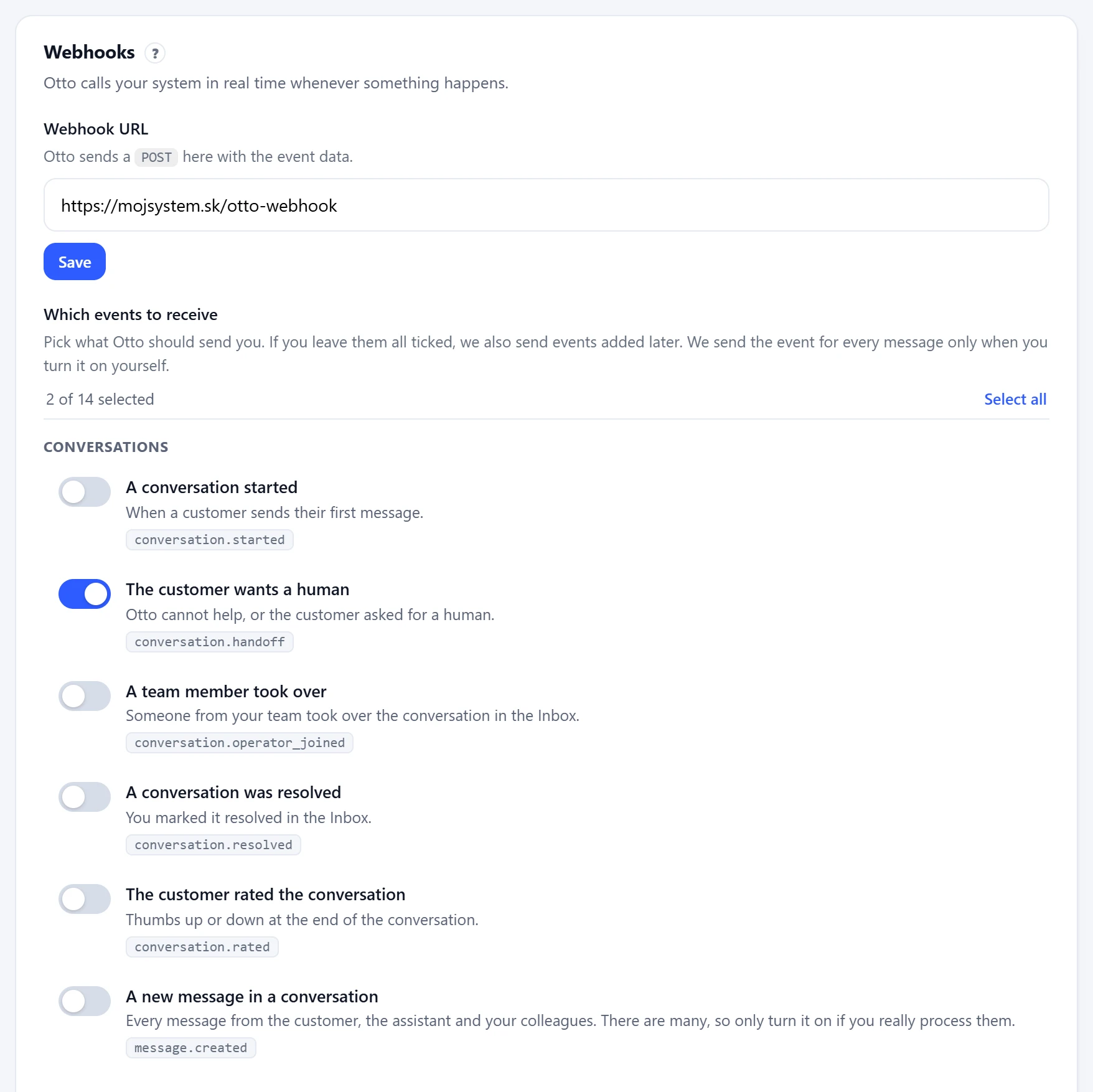
Otto sends a POST to your URL when something happens: a new conversation, a handoff, a contact, a complaint, an imported catalogue. Signed per Standard Webhooks.
On this page
Setting it up
- In the panel open Settings, the Connections section, the Webhooks row.
- Click Add a webhook. Name the webhook, enter a public
https://address and pick the events. If you leave all of them selected, we also send events added later. - Click Add. You find the signing secret
whsec_…after clicking Edit, keep it to verify signatures. - Test event checks the connection right away. You receive a
test.pingevent.
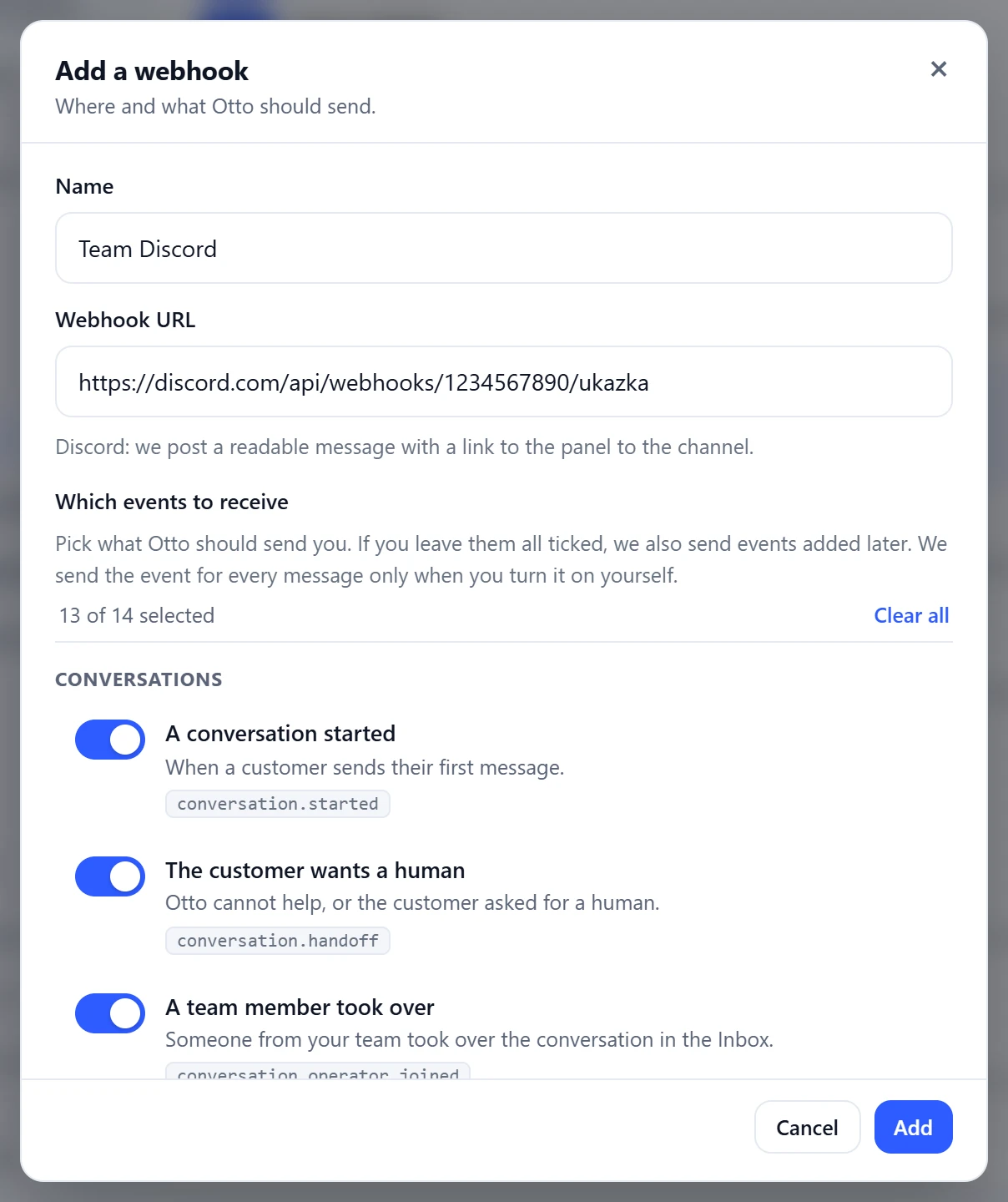
You can have up to 10 webhooks, each with its own address, events and signing secret. When one stops accepting events, we turn off only that one.
Discord and Slack
When you paste a webhook address from Discord (https://discord.com/api/webhooks/…) or Slack (https://hooks.slack.com/…), we recognize it and instead of JSON we post a readable message in your company’s language, for example “The customer wants a person” with their question and a link to the conversation in the panel. We send the customer’s text without formatting, we mention nobody in the channel and links don’t unfold into previews.
In Discord you create the address in the channel settings, under Integrations, Webhooks. In Slack through the Incoming Webhooks app. The address is secret, whoever has it can post to the channel.
Events
| Event | When it comes | data |
|---|---|---|
conversation.started | A conversation started When a customer sends their first message. | { conversationId, question, customer } |
conversation.handoff | The customer wants a human Otto cannot help, or the customer asked for a human. | { conversationId, question, confidence } |
conversation.operator_joined | A team member took over Someone from your team took over the conversation in the Inbox. | { conversationId, operator } |
conversation.resolved | A conversation was resolved You marked it resolved in the Inbox. | { conversationId } |
conversation.rated | The customer rated the conversation Thumbs up or down at the end of the conversation. | { conversationId, rating } |
message.created opt-in | A new message in a conversation Every message from the customer, the assistant and your colleagues. There are many, so only turn it on if you really process them. | { id, conversationId, role, kind, text, author } |
lead.created | A contact was left A name, email or phone filled in the chat form. | { id, conversationId, name, email, phone, customer } |
lead.updated | A contact was handled or reopened Someone in the panel or through the API changed whether a contact is handled. | { id, conversationId, handled } |
return.created | A complaint or return was filed The customer submitted the form with any attachments. | { id, kind, orderId } |
return.updated | A complaint or return changed status You approved, rejected or handled it. | { id, kind, orderId, status } |
unanswered.created | Missing answer A customer question whose answer isn’t in your knowledge or on your site. | { conversationId, question } |
catalog.synced | Catalogue imported The product feed was imported, with the number of products. | { source, products } |
catalog.failed | Catalogue import failed The product feed couldn’t be imported. Sent on the first failure, not on every one after. | { source, error } |
usage.threshold | AI reply limit running low Sent at 80% and at 100% of your plan’s AI reply limit. | { used, limit, level } |
message.created only comes when you turn it on yourself. There are many of them, and Select all leaves it out.
Request body
{
  "id": "1b6f6a3e-0f7c-4a51-9a3d-6a2f0e8c4b11",
  "event": "lead.created",
  "at": "2026-10-10T08:14:03.512Z",
  "apiVersion": "1",
  "tenantId": "3f6c2a10-8d4e-4c1b-a6f2-9e0d7b5c3a21",
  "tenant": "Váš obchod",
  "data": {
    "id": "8353028d-e582-4e08-8ed9-f882d200cd22",
    "conversationId": "37e7d86d-57bf-455f-9fc6-8c856a607d2f",
    "name": "Ján Novák",
    "email": "jan@example.sk",
    "phone": ""
  }
}
The id stays the same across retries. When the same id arrives again, drop the duplicate.
Verifying the signature
We sign per Standard Webhooks, so a ready-made library for Node.js, PHP, Python and other languages can verify it. Every request carries three headers:
webhook-id | the event id, the same across retries |
webhook-timestamp | the attempt time in seconds since 1 January 1970 |
webhook-signature | v1,<signature>, where the signature is Base64 of HMAC-SHA256 over id.timestamp.body |
The HMAC key is the signing secret without the whsec_ prefix, decoded from Base64. Compute the signature from the raw body, before you parse the JSON. Reject the attempt when the signature does not match or the time is more than 5 minutes off.
import crypto from "node:crypto";

export function overPodpis(secret, hlavicky, suroveTelo) {
  const id = hlavicky["webhook-id"];
  const cas = hlavicky["webhook-timestamp"];
  const kluc = Buffer.from(secret.replace(/^whsec_/, ""), "base64");
  const ocakavany = crypto.createHmac("sha256", kluc).update(id + "." + cas + "." + suroveTelo).digest("base64");
  const sedi = String(hlavicky["webhook-signature"] || "").split(" ").some((cast) => {
    const [verzia, podpis] = cast.split(",");
    return verzia === "v1" && podpis && podpis.length === ocakavany.length
      && crypto.timingSafeEqual(Buffer.from(podpis), Buffer.from(ocakavany));
  });
  return sedi && Math.abs(Date.now() / 1000 - Number(cas)) < 300;
}function overPodpis(string $secret, array $h, string $suroveTelo): bool {
$kluc = base64_decode(preg_replace('/^whsec_/', '', $secret));
$sprava = $h['webhook-id'] . '.' . $h['webhook-timestamp'] . '.' . $suroveTelo;
$ocakavany = base64_encode(hash_hmac('sha256', $sprava, $kluc, true));
foreach (explode(' ', $h['webhook-signature'] ?? '') as $cast) {
[$verzia, $podpis] = array_pad(explode(',', $cast, 2), 2, '');
if ($verzia === 'v1' && hash_equals($ocakavany, $podpis)) {
return abs(time() - (int) $h['webhook-timestamp']) < 300;
}
}
return false;
}import base64, hashlib, hmac, time
def over_podpis(secret: str, h: dict, surove_telo: bytes) -> bool:
kluc = base64.b64decode(secret.removeprefix("whsec_"))
sprava = f"{h['webhook-id']}.{h['webhook-timestamp']}.".encode() + surove_telo
ocakavany = base64.b64encode(hmac.new(kluc, sprava, hashlib.sha256).digest()).decode()
sedi = any(
hmac.compare_digest(cast.split(",", 1)[1], ocakavany)
for cast in h.get("webhook-signature", "").split()
if cast.startswith("v1,")
)
return sedi and abs(time.time() - int(h["webhook-timestamp"])) < 300We still send the original X-Otto-Signature: sha256=<HMAC_SHA256(secret, body) in hex> header, so older integrations keep working.
Retries and disabling
Answer with a 2xx within 5 seconds and do the work afterwards. When no answer comes or it is not 2xx, we try again after: right away, 5 s, 5 min, 30 min, 2 h, 5 h, 10 h, 10 h, 14 h, 24 h, about 3 days in total. Events wait in our database, so a restart on our side does not lose them. We do not retry a 4xx other than 408 and 429.
If we deliver nothing for 3 days, we disable the webhook and email you. Save it again in the panel to turn it back on.
Deliveries through the API
GET /v1/webhooks/deliveries?status=failedlists deliveries with attempts, the response code and the error.POST /v1/webhooks/deliveries/<id>/resendsends an event again. We keep the event body for 7 days after the last attempt.POST /v1/webhooks/testsends a test event and tells you right away how your URL answered.
Registering webhooks through the API
Ready-made connections such as Zapier or Make create a webhook themselves when the user switches a trigger on and delete it when they switch it off. The key needs the webhooks_write permission and the Business or Custom plan.
GET /v1/webhookslists your webhooks:id,name, a shortenedurl,format,eventsanddisabled. The secret is not included.POST /v1/webhookswith the body{ "url": "https://...", "events": ["lead.created"], "name": "Zapier" }creates a webhook. The same checks apply as in the panel: a public address only, not your own Otto domains or an internal network, at most 10 webhooks and an email to the owner.nameis optional. Only this response returns the secret used to sign events, so store it. The format (json,discordorslack) follows the address.DELETE /v1/webhooks/<id>deletes a webhook. One that does not exist returns404withwebhook_nie_je.
At most 30 webhooks can be created this way per hour.