

Product catalogue
Otto answers about products only from its catalogue. You fill it with an XML feed, a WooCommerce feed, through the API, or Otto reads your website.
Four ways
| Way | When it fits | Refresh |
|---|---|---|
| XML feed | You have a feed for Heureka, Zboží or Google. | On its own once older than 5 hours |
| WooCommerce feed | You run WordPress with WooCommerce and the Otto plugin. | Like an XML feed |
| Catalogue API | Your catalogue lives in an ERP or your own system. | When you send a change |
| Reading your website | You have no feed, for example a services website. | Once every 7 days |
XML feed
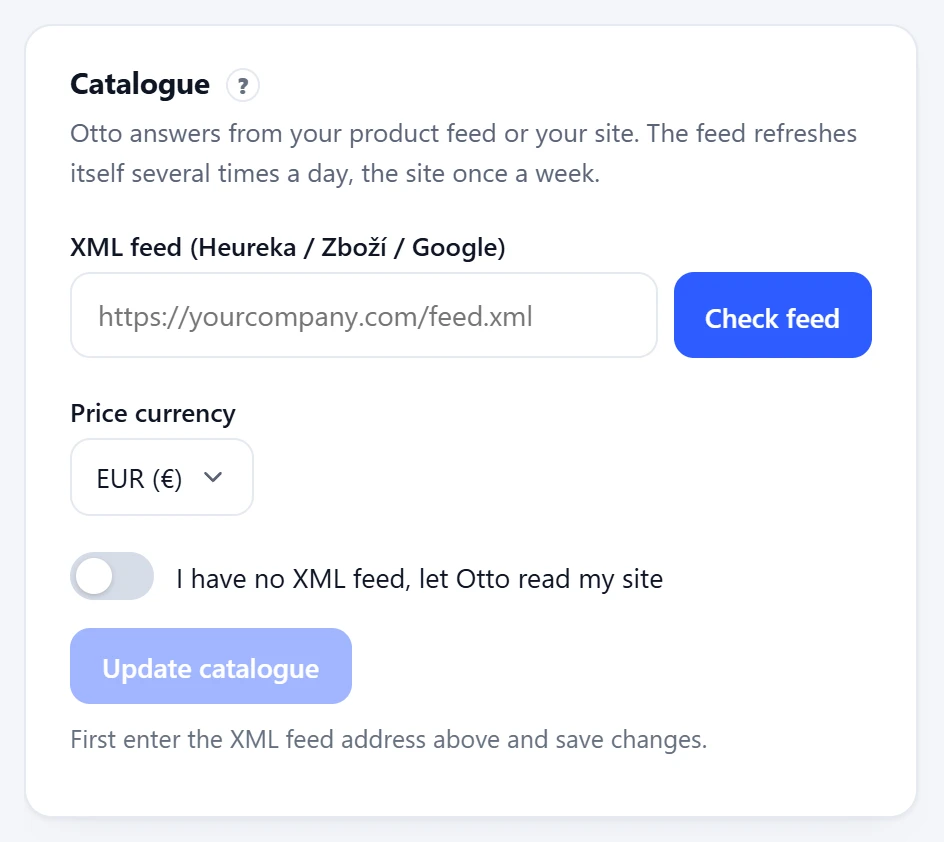
In the panel open Settings, the Catalogue section, and paste the feed address. Check feed tries it before you save: the panel tells you how many products it found and in which currency. Otto then loads the feed again whenever it is older than 5 hours. Use Update catalogue to bring in a change right away.
Otto understands two formats. It ignores other elements, so you do not need to change your feed.
| Field | Heureka, Zboží (<SHOP><SHOPITEM>) | Google Merchant (<rss><item>) |
|---|---|---|
| Id | ITEM_ID, else PRODUCTNO, EAN or URL | g:id |
| Name | PRODUCTNAME or PRODUCT | title |
| Description | DESCRIPTION | description |
| Link and image | URL, IMGURL | link, g:image_link |
| Price | PRICE_VAT, else PRICE | g:price, a current sale g:sale_price with g:sale_price_effective_date |
| Availability | DELIVERY_DATE: 0 is in stock, a number is days, a date is the delivery date | g:availability: in_stock, out_of_stock, preorder, backorder |
| Category and brand | CATEGORYTEXT, MANUFACTURER | g:product_type, g:brand |
| Parameters | PARAM with PARAM_NAME and VAL | no |
Otto takes the currency from the price when it carries a code (such as 12.90 EUR in a Google feed). Otherwise the Price currency setting in the panel applies, and without that, the currency from the feed domain (.cz is CZK, anything else EUR).
WooCommerce feed
The Otto plugin for WordPress publishes a product feed at /wp-json/otto-chat/v1/feed. Copy its address from the plugin settings and paste it into the Catalogue like any feed. See WordPress and WooCommerce.
Catalogue through the API
When your catalogue lives in your own system, send it to Otto through the API. These three routes work on every plan, because they replace the XML feed. A product only needs id and title.
{
  "products": [
    {
      "id": "1042",
      "title": "Espresso zmes Domáca 250 g",
      "description": "Zrnková káva, 70 % arabika, tóny čokolády a orieškov.",
      "url": "https://vas-obchod.sk/espresso-domaca",
      "image": "https://vas-obchod.sk/obrazky/espresso-domaca.jpg",
      "price": 12.9,
      "currency": "EUR",
      "availability": "skladom",
      "category": "Káva > Zrnková káva",
      "manufacturer": "Pražiareň Príklad",
      "params": { "Hmotnosť": "250 g", "Pôvod": "Brazília, Kolumbia" }
    }
  ]
}| Route | What it does | Limit |
|---|---|---|
POST /api/v1/products/snapshot | The whole catalogue. Anything missing is deleted. | 5000 products, 12 times per hour |
POST /api/v1/products | Only the products you send, nothing is deleted. For price or stock changes. | 500 products at once |
DELETE /api/v1/products/<id> | Deletes one product by your id. |
snapshot has far fewer products than Otto holds, Otto deletes nothing and returns a warning with errcode: "prune_skipped". It is a safety net against a broken export. If the smaller catalogue is right, send it once more.Reading your website
Without a feed, turn on I have no XML feed, let Otto read my site in the Catalogue and enter your website address. Otto can only read a website where the chat is already running, which is how we check it is yours. It then reads it again every 7 days. Even with a feed it reads your pages once a week, so it can answer questions about shipping, payment and your company.