

Chat in a mobile app
Show the Otto chat in your Android and iOS app through a web view. You open one address and install nothing.
error event with reason plan. Write to us at podpora@ottoai.sk.The chat address
https://ottoai.sk/m/<public key>?lang=enThe public key is the same as in the website chat code (data-otto-key). The app does not need the secret API key. lang is sk, cs or en; without it, the panel language applies.
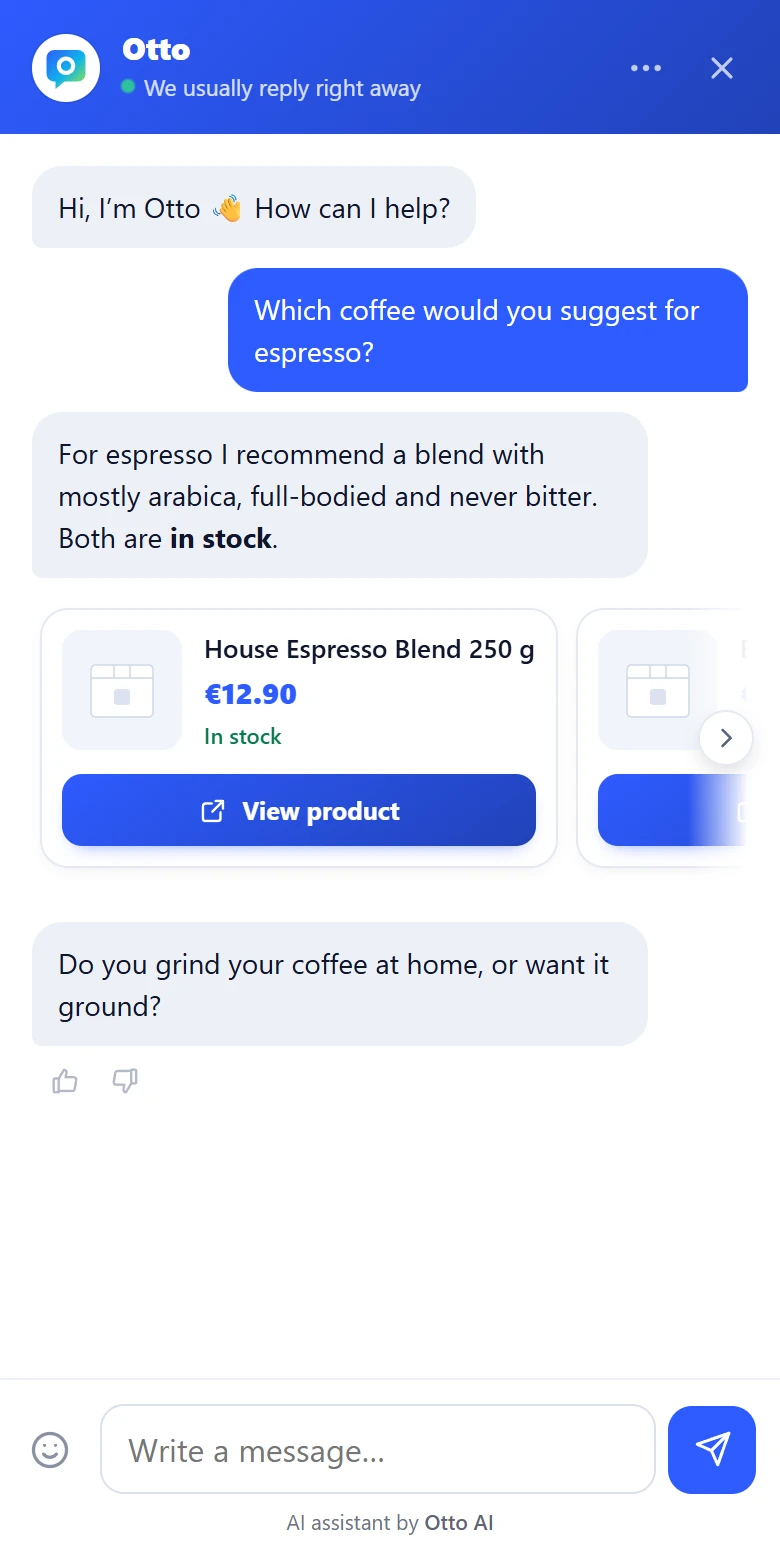
What the page does
- The chat opens full screen, without the bubble, and respects the display cutout.
- The cross in the header does not close the chat but sends your app a
closeevent. Your app closes the screen. - Links and product cards do not leave the chat. Your app receives an event with the URL and decides where to open it.
- The conversation stays in the web view storage and continues when the customer comes back.
Events for your app
The page sends messages through a bridge your app attaches. Each one is JSON with "source": "otto".
| type | When it comes | Other fields |
|---|---|---|
ready | the chat loaded and is open | |
close | the customer tapped the cross or pressed Esc | |
message | an answer from Otto or a message from a colleague arrived | role: bot or operator |
handoff | Otto handed the conversation to a colleague | |
resolved | a colleague closed the conversation | |
productClick | the customer tapped a product card | url |
link | the customer tapped another link | url |
error | the chat is off, the key is invalid or in-app chat is not turned on for the company | reason: off, key or plan |
Signed-in customers
If you want your colleague to see the signed-in customer’s name and email, set window.ottoUser before the page loads. Never put personal data in the URL. The examples below show it for each platform.
Android (Kotlin)
Attach the bridge with androidx.webkit and the allowed origin https://ottoai.sk, not with addJavascriptInterface.
val web = WebView(this)
web.settings.javaScriptEnabled = true
web.settings.domStorageEnabled = true

if (WebViewFeature.isFeatureSupported(WebViewFeature.WEB_MESSAGE_LISTENER)) {
    WebViewCompat.addWebMessageListener(web, "ottoChatBridge", setOf("https://ottoai.sk")) { _, sprava, _, _, _ ->
        val u = JSONObject(sprava.data ?: "{}")
        when (u.optString("type")) {
            "close" -> finish()
            "productClick", "link" -> startActivity(Intent(Intent.ACTION_VIEW, Uri.parse(u.optString("url"))))
        }
    }
}
if (WebViewFeature.isFeatureSupported(WebViewFeature.DOCUMENT_START_SCRIPT)) {
    WebViewCompat.addDocumentStartJavaScript(web,
        "window.ottoUser = { name: 'Ján Novák', email: 'jan@example.sk' };", setOf("https://ottoai.sk"))
}
web.loadUrl("https://ottoai.sk/m/pk_vas_kluc?lang=en")
iOS (Swift)
final class OttoMost: NSObject, WKScriptMessageHandler {
    var zatvor: () -> Void = {}
    func userContentController(_ c: WKUserContentController, didReceive m: WKScriptMessage) {
        guard m.frameInfo.securityOrigin.host == "ottoai.sk", let u = m.body as? [String: Any] else { return }
        switch u["type"] as? String {
        case "close": zatvor()
        case "productClick", "link":
            if let s = u["url"] as? String, let url = URL(string: s) { UIApplication.shared.open(url) }
        default: break
        }
    }
}

let most = OttoMost()
let nastavenie = WKWebViewConfiguration()
nastavenie.userContentController.add(most, name: "ottoChat")
nastavenie.userContentController.addUserScript(WKUserScript(
    source: "window.ottoUser = { name: 'Ján Novák', email: 'jan@example.sk' };",
    injectionTime: .atDocumentStart, forMainFrameOnly: true))
let web = WKWebView(frame: .zero, configuration: nastavenie)
web.load(URLRequest(url: URL(string: "https://ottoai.sk/m/pk_vas_kluc?lang=en")!))
WKUserContentController keeps a strong reference to the bridge. When you close the screen, call removeScriptMessageHandler(forName: "ottoChat").
React Native
import { WebView } from "react-native-webview";
import { Linking } from "react-native";

<WebView
  source={{ uri: "https://ottoai.sk/m/pk_vas_kluc?lang=en" }}
  injectedJavaScriptBeforeContentLoaded={"window.ottoUser = { name: 'Ján Novák', email: 'jan@example.sk' }; true;"}
  onMessage={(e) => {
    const u = JSON.parse(e.nativeEvent.data);
    if (u.type === "close") navigation.goBack();
    if (u.type === "productClick" || u.type === "link") Linking.openURL(u.url);
  }}
/>
Flutter
final ovladac = WebViewController()
  ..setJavaScriptMode(JavaScriptMode.unrestricted)
  ..addJavaScriptChannel('OttoChat', onMessageReceived: (sprava) {
    final u = jsonDecode(sprava.message) as Map<String, dynamic>;
    if (u['type'] == 'close') Navigator.of(context).pop();
    if (u['type'] == 'productClick' || u['type'] == 'link') launchUrl(Uri.parse(u['url'] as String));
  })
  ..loadRequest(Uri.parse('https://ottoai.sk/m/pk_vas_kluc?lang=en'));
webview_flutter cannot inject a script before the page loads, so you cannot pass a signed-in customer here yet.
Privacy and app stores
- Since November 2025 (guideline 5.1.2(i)), Apple wants an app to say clearly what personal data it sends to a third-party AI and to get consent first. If you pass
window.ottoUser, ask the customer first. - In the App Store privacy labels and the Google Play Data safety form, list the chat messages and the details you pass to the chat.
- The chat lives on
ottoai.sk. It cannot be embedded in another site’s iframe, but works in your app’s web view.