

WordPress
How to add the Otto chat to a WordPress site with the Otto plugin, connect the WooCommerce product feed and what to do if the chat does not show.
On this page

WordPress is a content management system, and with WooCommerce it also runs online stores. You add the chat with our Otto plugin, so you do not paste any code. It takes about 5 minutes.
What you need
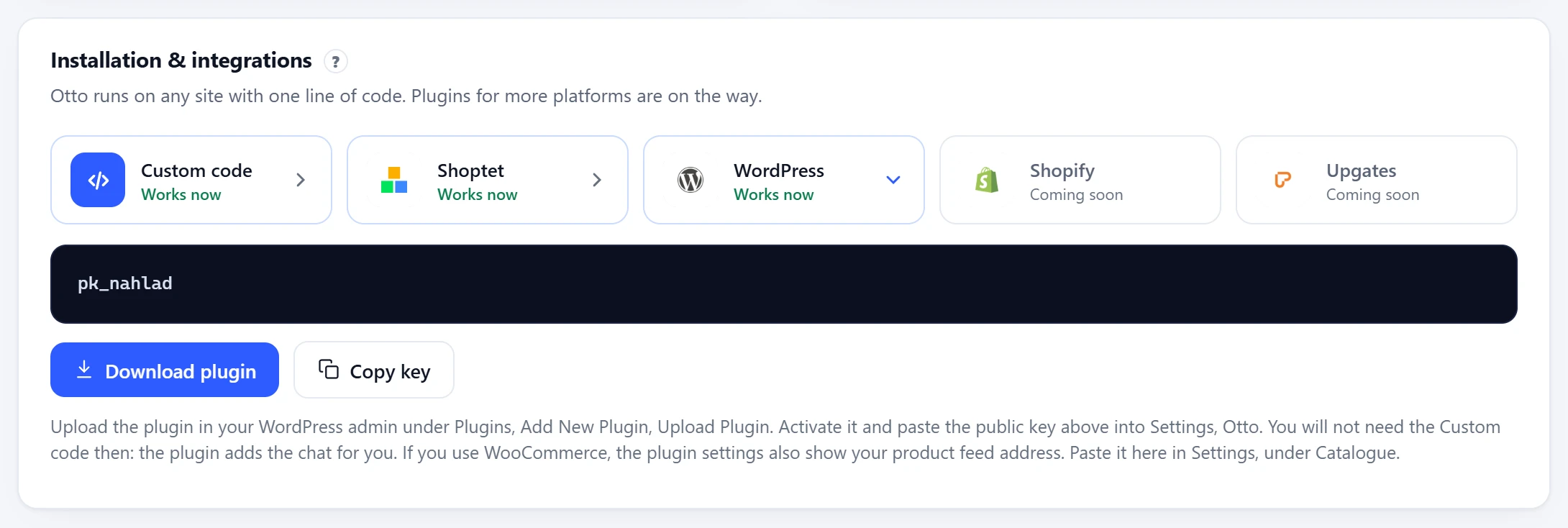
- An Otto account. You find the plugin and the key in the panel under Overview, on the Installation & integrations card, on the WordPress tile.
- An account with the Administrator role. On a network of sites (multisite), only the network admin can upload plugins.
- WordPress 6.0 or later and PHP 7.4 or later.
- On WordPress.com, a paid plan: Personal or higher.
Plugin and key
On the WordPress tile, download the plugin with Download plugin and copy the public key with Copy key. The plugin is also at ottoai.sk/otto-chat.zip.
Installing the plugin
Otto plugin
- In the Otto panel, on the WordPress tile, click Download plugin and then Copy key. The plugin is also at ottoai.sk/otto-chat.zip.
- In your WordPress admin, open Plugins, Add Plugin and click Upload Plugin at the top.
- Choose the downloaded
otto-chat.zipfile and click Install Now. Do not unzip the file first. - When WordPress says the plugin was installed successfully, click Activate Plugin.
- Open Settings, Otto, paste the key into Public key and click Save Changes.
- Under Connection check, click Check the key. When the plugin says the connection works and shows the assistant’s name, you are done.
Without the plugin, if you cannot upload it
- In the Otto panel, open the Custom code tile and click Copy code. The WordPress tile only shows the key.
- With a block theme, open Appearance, Editor and Patterns in WordPress. Under the template parts, choose Footer and open your site’s footer for editing.
- Add a Custom HTML block at the end of the footer and paste the chat code into it. In WordPress 7, click Edit HTML first, paste the code and click Update.
- Click Save at the top and confirm.
- With a classic theme that has no Editor, a developer adds the code to the child theme’s footer just before
</body>.
The plugin settings have a few more options. In Do not show on pages, enter the IDs of pages where you do not want the chat, such as checkout. You will see the ID in the address when you edit the page (post=123). Tell the assistant who is logged in adds the name, email and phone of a logged-in customer to the page and keeps that page out of the cache. Untick Show on the website to hide the chat for a while, your settings stay.
You can also follow the official WordPress help.
Checking it works
- Open your website in a new browser window and reload. A chat bubble should pop up in the bottom right.
- Send the chat a test question. Otto answers within a few seconds.
- In the panel, under Settings, Connections, the Your website row shows the domain the chat runs on.
Product catalogue
With WooCommerce, the plugin publishes a product feed in the Google format, and you copy its address, ending in /wp-json/otto-chat/v1/feed, in Settings, Otto, under WooCommerce catalogue. It has published products that are not hidden from the catalogue, each variation separately, with prices including sales and with availability, up to 5,000 items. The plugin keeps the finished feed for an hour and builds it again when a product or stock changes.
Paste the feed address in the panel under Settings, Catalogue, and click Check feed. The panel tells you how many products it found, and Otto keeps the feed up to date on its own. More in Product catalogue.
Troubleshooting
Plugins has no Add Plugin item
Only the Administrator role can upload plugins, and on a multisite network only the network admin. On WordPress.com, uploading plugins needs the Personal plan or higher. If you cannot upload the plugin, use the path without it.
The plugin says the key is not in the right format or Otto does not know it
The field takes only the key starting with pk_, not the whole chat code. Copy it again with Copy key on the WordPress tile, click Save Changes and then Check the key.
The plugin settings show no feed address
The WooCommerce catalogue section appears only when WooCommerce is active. The feed address shows after you tick Publish a product feed for Otto and click Save Changes.
The bubble appears only after I move the mouse or scroll
A speed optimisation plugin delays scripts, for example WP Rocket with Delay JavaScript execution. Add ottoai.sk/widget.js to its exclusions (in WP Rocket, the Excluded JavaScript Files field) and clear its cache.
Also check
- Reload the page without cache with Ctrl+F5, or open it in a private window.
- The code should be on the page only once, a second copy is ignored.
- A cookie consent bar can block scripts until the visitor agrees. If the chat only shows up after consent, see Cookie consent.
- If your site sends a Content-Security-Policy header, allow
https://ottoai.skin it, as shown in Content-Security-Policy. - In the browser console (F12), look for messages starting with
[Otto]. They tell you what the chat is missing. - Still nothing? Write to us at podpora@ottoai.sk and include your website address.
Removing the chat
To hide the chat for a while, untick Show on the website in Settings, Otto and save. To remove it for good, go to Plugins, Installed Plugins, click Deactivate under Otto and then Delete, which also removes the plugin’s settings.